WordPress忘记后台密码最快的解决办法


操作说明:
下载下面的压缩包,解压出来得到一个 密码重置.PHP文件,上传到网站根目录下-然后访问域名+/czmima.php?key=www.a8ymw.com
比如我们的域名是 www.a8ymw.com ,那么格式就是 https://www.a8ymw.com//czmima.php?key=www.a8ymw.com
05e2a23b4720260107163749.zip
zip文件
6.4K
安全问题:
重置WordPress后台密码以后,文件会被自动删除,无需担心安全问题。
操作如图:
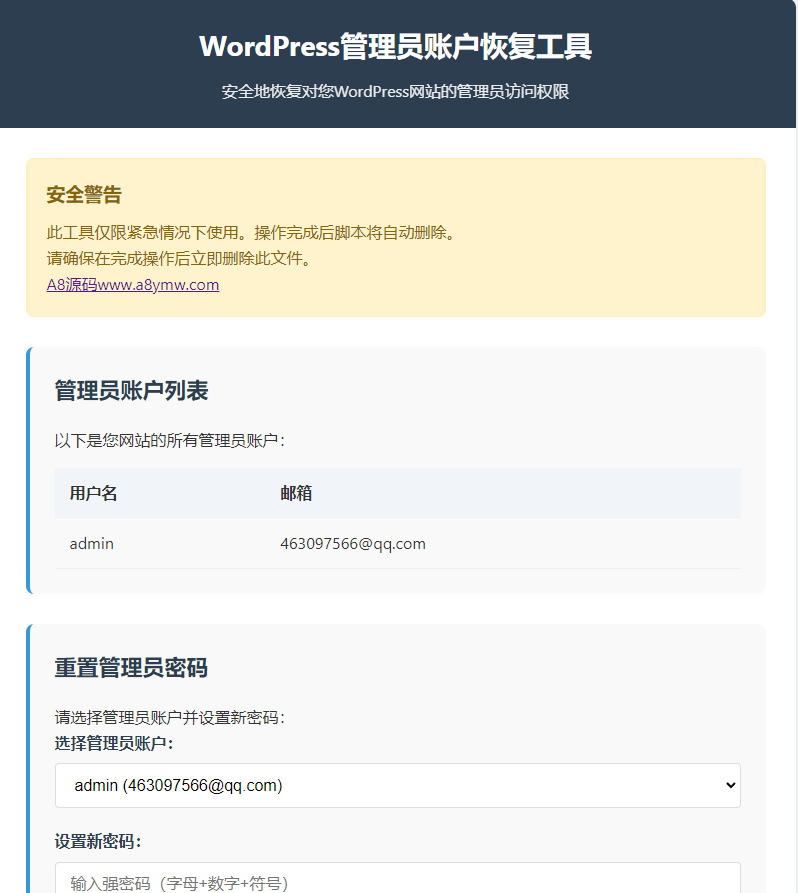
也可以手动复制下面的代码,自己创建一个.php文件,命名为czmima.php
<?php
/**
 * WordPress管理员账户恢复工具
 * 功能:
 *   1. 列出所有管理员账户(用户名和邮箱)
 *   2. 重置管理员密码
 * 安全机制:
 *   - 必须通过密钥访问
 *   - 操作后自动删除脚本
  *   -A8源码网发布 www.a8ymw.com

 */

// ==================== 配置区域 ====================
define('ACCESS_KEY', 'www.a8ymw.com');
// =================================================

// 安全验证
if (!isset($_GET['key']) || $_GET['key'] !== ACCESS_KEY) {
    die('<div style="font-family: Arial, sans-serif; padding: 20px; background: #f8d7da; color: #721c24; border: 1px solid #f5c6cb; max-width: 600px; margin: 50px auto; text-align: center;">
        <h2>访问被拒绝</h2>
        <p>未提供有效密钥或密钥不正确</p>
        <p style="font-size: 0.9em; margin-top: 20px;">请使用正确的密钥访问此工具</p>
    </div>');
}

// 加载WordPress环境
if (!file_exists('wp-load.php')) {
    die('<div style="font-family: Arial, sans-serif; padding: 20px; background: #f8d7da; color: #721c24; border: 1px solid #f5c6cb; max-width: 600px; margin: 50px auto; text-align: center;">
        <h2>错误:找不到WordPress</h2>
        <p>请将此文件放在WordPress安装的根目录下</p>
    </div>');
}

require_once('wp-load.php');

// 获取所有管理员账户
function get_admin_users() {
    $admin_users = get_users(array(
        'role__in' => array('administrator'),
        'fields' => array('user_login', 'user_email')
    ));

    return $admin_users;
}

// 重置管理员密码
function reset_admin_password($username, $new_password) {
    $user = get_user_by('login', $username);

    if (!$user) {
        return array('success' => false, 'message' => "找不到用户: {$username}");
    }

    wp_set_password($new_password, $user->ID);
    return array('success' => true, 'message' => "管理员 '{$username}' 密码已重置为: {$new_password}");
}

// 处理表单提交
$action_result = null;
if ($_SERVER['REQUEST_METHOD'] == 'POST') {
    if (isset($_POST['action']) && $_POST['action'] == 'list_admins') {
        $admin_users = get_admin_users();
    }
    elseif (isset($_POST['action']) && $_POST['action'] == 'reset_password') {
        $username = sanitize_text_field($_POST['username']);
        $new_password = $_POST['password'];
        $action_result = reset_admin_password($username, $new_password);

        // 重置成功后自动删除脚本
        if ($action_result['success']) {
            register_shutdown_function(function() {
                if (file_exists(__FILE__)) {
                    unlink(__FILE__);
                }
            });
        }
    }
}

$admin_users = get_admin_users();
?>
<!DOCTYPE html>
<html lang="zh-CN">
<head>
    <meta charset="UTF-8">
    <meta name="viewport" content="width=device-width, initial-scale=1.0">
    <title>WordPress管理员账户恢复工具-A8源码网发布</title>
    <style>
        * {
            margin: 0;
            padding: 0;
            box-sizing: border-box;
        }

        body {
            font-family: 'Segoe UI', Tahoma, Geneva, Verdana, sans-serif;
            line-height: 1.6;
            color: #333;
            background-color: #f5f7fa;
            padding: 20px;
        }

        .container {
            max-width: 800px;
            margin: 0 auto;
            background: white;
            border-radius: 10px;
            box-shadow: 0 0 20px rgba(0, 0, 0, 0.1);
            overflow: hidden;
        }

        header {
            background: #2c3e50;
            color: white;
            padding: 25px 30px;
            text-align: center;
        }

        h1 {
            font-size: 28px;
            margin-bottom: 10px;
        }

        .description {
            font-size: 16px;
            opacity: 0.9;
            max-width: 600px;
            margin: 0 auto;
        }

        .content {
            padding: 30px;
        }

        .section {
            margin-bottom: 30px;
            padding: 25px;
            background: #f9f9f9;
            border-radius: 8px;
            border-left: 4px solid #3498db;
        }

        .section-title {
            font-size: 22px;
            color: #2c3e50;
            margin-bottom: 20px;
            display: flex;
            align-items: center;
        }

        .section-title i {
            margin-right: 10px;
            font-size: 24px;
        }

        .admin-list {
            width: 100%;
            border-collapse: collapse;
            margin-top: 15px;
        }

        .admin-list th, .admin-list td {
            padding: 12px 15px;
            text-align: left;
            border-bottom: 1px solid #eee;
        }

        .admin-list th {
            background-color: #f1f5f9;
            font-weight: 600;
        }

        .admin-list tr:hover {
            background-color: #f8f9fa;
        }

        .form-group {
            margin-bottom: 20px;
        }

        label {
            display: block;
            margin-bottom: 8px;
            font-weight: 600;
            color: #2c3e50;
        }

        input[type="text"], input[type="password"], select {
            width: 100%;
            padding: 12px 15px;
            border: 1px solid #ddd;
            border-radius: 4px;
            font-size: 16px;
            transition: border-color 0.3s;
        }

        input:focus, select:focus {
            border-color: #3498db;
            outline: none;
            box-shadow: 0 0 0 2px rgba(52, 152, 219, 0.2);
        }

        button {
            background: #3498db;
            color: white;
            border: none;
            padding: 12px 25px;
            font-size: 16px;
            border-radius: 4px;
            cursor: pointer;
            transition: background 0.3s;
            font-weight: 600;
        }

        button:hover {
            background: #2980b9;
        }

        .btn-danger {
            background: #e74c3c;
        }

        .btn-danger:hover {
            background: #c0392b;
        }

        .result {
            padding: 15px;
            border-radius: 4px;
            margin-top: 20px;
        }

        .success {
            background: #d4edda;
            color: #155724;
            border: 1px solid #c3e6cb;
        }

        .error {
            background: #f8d7da;
            color: #721c24;
            border: 1px solid #f5c6cb;
        }

        .warning {
            background: #fff3cd;
            color: #856404;
            border: 1px solid #ffeeba;
            padding: 20px;
            border-radius: 8px;
            margin-bottom: 30px;
        }

        .warning h3 {
            margin-bottom: 10px;
            color: #856404;
        }

        .footer {
            text-align: center;
            padding: 20px;
            background: #f1f5f9;
            color: #666;
            font-size: 14px;
        }

        @media (max-width: 600px) {
            .content {
                padding: 20px 15px;
            }

            .section {
                padding: 20px 15px;
            }
        }
    </style>
</head>
<body>
    <div class="container">
        <header>
            <h1>WordPress管理员账户恢复工具</h1>
            <p class="description">安全地恢复对您WordPress网站的管理员访问权限</p>
        </header>

        <div class="content">
            <div class="warning">
                <h3>安全警告</h3>
                <p>此工具仅限紧急情况下使用。操作完成后脚本将自动删除。</p>
                <p>请确保在完成操作后立即删除此文件。</p>
				<p><a href="https://www.a8ymw.com/" target="_blank">A8源码www.a8ymw.com</a></p>
            </div>

            <!-- 管理员账户列表 -->
            <div class="section">
                <h2 class="section-title">管理员账户列表</h2>
                <p>以下是您网站的所有管理员账户:</p>

                <table class="admin-list">
                    <thead>
                        <tr>
                            <th>用户名</th>
                            <th>邮箱</th>
                        </tr>
                    </thead>
                    <tbody>
                        <?php if (!empty($admin_users)): ?>
                            <?php foreach ($admin_users as $admin): ?>
                                <tr>
                                    <td><?php echo esc_html($admin->user_login); ?></td>
                                    <td><?php echo esc_html($admin->user_email); ?></td>
                                </tr>
                            <?php endforeach; ?>
                        <?php else: ?>
                            <tr>
                                <td colspan="2" style="text-align: center;">未找到管理员账户</td>
                            </tr>
                        <?php endif; ?>
                    </tbody>
                </table>
            </div>

            <!-- 密码重置表单 -->
            <div class="section">
                <h2 class="section-title">重置管理员密码</h2>
                <p>请选择管理员账户并设置新密码:</p>

                <?php if ($action_result): ?>
                    <div class="result <?php echo $action_result['success'] ? 'success' : 'error'; ?>">
                        <?php echo $action_result['message']; ?>
                        <?php if ($action_result['success']): ?>
                            <p>请立即登录并更改密码!</p>
                        <?php endif; ?>
                    </div>
                <?php endif; ?>

                <form method="POST">
                    <input type="hidden" name="action" value="reset_password">

                    <div class="form-group">
                        <label for="username">选择管理员账户:</label>
                        <select id="username" name="username" required>
                            <option value="">-- 请选择账户 --</option>
                            <?php foreach ($admin_users as $admin): ?>
                                <option value="<?php echo esc_attr($admin->user_login); ?>">
                                    <?php echo esc_html($admin->user_login); ?> (<?php echo esc_html($admin->user_email); ?>)
                                </option>
                            <?php endforeach; ?>
                        </select>
                    </div>

                    <div class="form-group">
                        <label for="password">设置新密码:</label>
                        <input type="text" id="password" name="password" required
                               placeholder="输入强密码(字母+数字+符号)">
                    </div>

                    <button type="submit">重置密码</button>
                </form>
            </div>
        </div>

        <div class="footer">
            <p>此工具将在密码重置成功后自动删除 | 安全密钥保护</p>
        </div>
    </div>
</body>
</html>

没有回复内容