

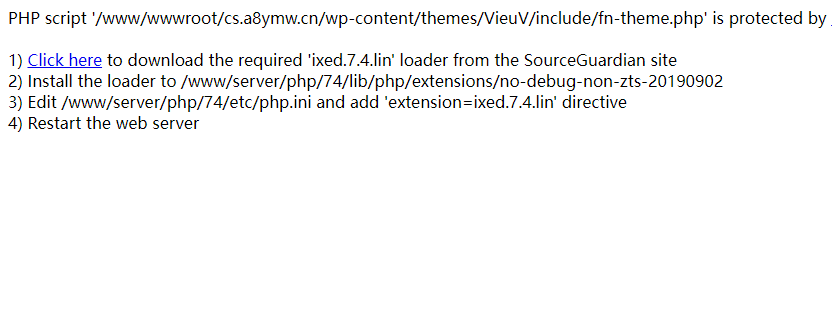
报错详情:
PHP script ‘/www/wwwroot/cs.a8ymw.cn/wp-content/themes/VieuV/include/fn-theme.php‘ is protected by SourceGuardian and requires a SourceGuardian loader ‘ixed.7.4.lin’ to be installed. 1) Click here to download the required ‘ixed.7.4.lin’ loader from the SourceGuardian site 2) Install the loader to /www/server/php/74/lib/php/extensions/no-debug-non-zts-20190902 3) Edit /www/server/php/74/etc/php.ini and add ‘extension=ixed.7.4.lin’ directive 4) Restart the web server
报错原因:
你的 WordPress 主题文件 fn-theme.php 是被 SourceGuardian 加密过的商业 PHP 文件,PHP 本身无法解析加密的文件,必须安装对应的 SourceGuardian 解密加载器(ixed.lin) 才能运行,缺一不可。
解决办法:
解决办法1:
1.打开宝塔-找到对应的PHP版本-安装sg11扩展
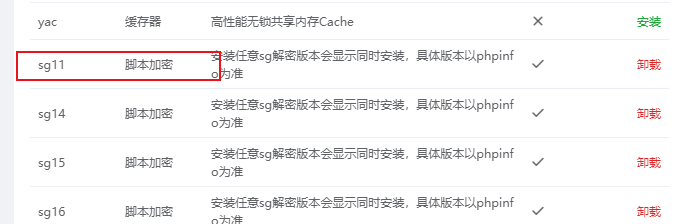
2.重启PHP服务
解决办法2:
1.下载下面的ixed.7.4.lin文件-上传到目录下
/www/server/php/74/lib/php/extensions/no-debug-non-zts-20190902
2.修改PHP对应版本的php.in文件最下面添加以下代码
extension=ixed.7.4.lin这里针对的是PHP7.4,这个版本支持大多数程序运行。
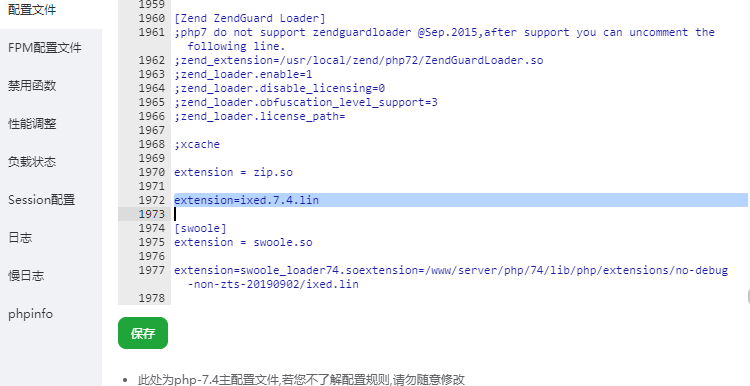
3.重启PHP服务
以上两个方法都试过,百分之百解决此问题!

没有回复内容